How does an IPTV encoder work?
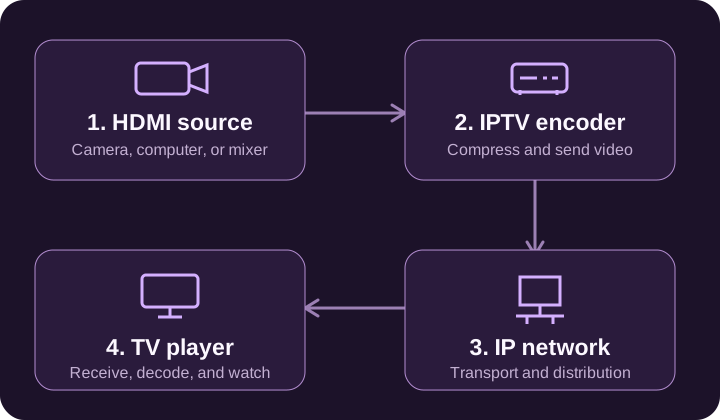
A camera, computer, or video mixer produces a picture and sound. An encoder compresses that source into a format a receiving system can use, then sends the result over a network. A server may distribute the stream to viewers, and a player decodes it for the pantalla. Encoding reduces the amount of data that needs to be transported.
The full path matters: source, encoder, network, distribution service, and player. A problem at any stage can affect the picture. A fast encoder alone cannot fix a weak connection or a player that does not support the chosen format.
HDMI to IPTV: what changes?
An HDMI IPTV encoder accepts an HDMI source and creates a network stream. HDMI carries the local audio and video signal into the encoder; Ethernet usually connects the encoder to the network. A simple HDMI cable or adapter does not perform this compression and streaming work by itself.
Before connecting equipment, check the supported input resolution, frame rate, audio format, and output protocol in its documentation. An HDMI input specification can differ de the maximum encoded output. The receiving service must accept the stream format you send.
What to check in a 4K IPTV encoder
Comprobar the complete input-to-output specification when comparing HD and 4K equipment. A device may accept a 4K signal but encode at a lower resolution or frame rate. Also check the codec, bitrate range, simultaneous outputs, and receiving device support.
Higher resolution does not automatically mean a better viewing experience. Source quality, available bandwidth, compression settings, and playback support all affect the result. For a real installation, test your own source and destination together before choosing settings for regular use.
H.264, H.265, and streaming protocols
A codec compresses and decompresses video. H.264 is commonly used for streaming, while H.265 is also called HEVC. Choose a format that your entire workflow supports, including the server and final player. Encoder support alone is not enough to guarantee playback.
A delivery protocol has a different role: it carries or delivers the stream. Equipment may offer RTMP, SRT, RTSP, HLS, or other outputs. The supported combination of codec and protocol varies by product and destination. Use the destination service’s current requirements when configuring an output, rather than treating these names as interchangeable.
Hardware encoders and software encoders
A hardware encoder is a dedicated device that handles video compression. A software encoder runs as part of a computer-based workflow and may use the computer’s processor or supported graphics hardware. Both approaches need compatible inputs, output formats, and enough processing capacity for the chosen settings.
Write down the job first: number of input sources, resolution, output destinations, operating hours, and who will manage the system. That makes it easier to compare equipment without choosing only by a headline specification or an advertised price.
Do you need an encoder to watch IPTV?
For a normal viewing subscription, the video has already been prepared for delivery. You generally use a supported player on a compatible Smart TV, streaming device, phone, tablet, or computer. A receiving box or app has a different job de an encoder used to send video.
IPTV Luxembourg is the brand name of this subscription and support website. The technical term ‘IPTV encoder’ refers to equipment or software at the sending side of a video workflow. Inicio viewers normally need a compatible player and an authorized viewing service, not encoding hardware.
What should you do next?
If you are researching encoder hardware, make a shortlist de your actual source, resolution, codec, protocol, latency, and destination requirements. Comprobar the manufacturer’s current documentation and test the complete workflow. This website does not sell encoding hardware.
If you were looking for a home viewing service rather than encoding equipment, the commercial part of this site is our IPTV subscription plans and prices. You can also check the IPTV channel list or ask about device compatibility.